Showing posts with label programming. Show all posts
Sunday, 6 December 2015
Sunday, 22 November 2015
Turning programmer into a beast
As you know that the semi-colon is normally used to terminate a statement in the field of programming.A programmer tries not to miss semi-colon in his program otherwise his program would be full of errors.
Do you want to turn a programmer into a beast?
Simply delete the semi-colon from his code and see the magic !!!!
Caution: Do not stay in his room after doing this otherwise he will kill you. :-)
Wednesday, 18 November 2015
Saturday, 14 November 2015
Comparison between C++ and Java
Now you should be a proud C++ programmer !!!!
Resource
This pic has been taken from groupinfo4u.com .
Wednesday, 11 November 2015
Friday, 16 October 2015
Thursday, 1 October 2015
Sunday, 20 September 2015
Friday, 11 September 2015
Object Oriented Programming in C++ by Robert Lafore
Introduction
Object Oriented Programming in C++
Object-Oriented Programming in C++ begins with the basic principles of the C++ programming language and systematically introduces increasingly advanced topics while illustrating the OOP methodology. While the structure of this book is similar to that of the previous edition, each chapter reflects the latest ANSI C++ standard and the examples have been thoroughly revised to reflect current practices and standards.
Author:
Robert Lafore
Date of publishing:
December 29, 2001
Publisher:
Sams Publishing
Language:
English
Genre:
Programming
ISBN:
- ISBN-10: 0672323087
- ISBN-13: 978-0672323089
Rating:
4.5/5 stars
Votes:
54
Reviewer:
David Horn
Review date:
January 30, 2004
Reviewer rating:
5/5 stars
Download link:
Thursday, 3 September 2015
Concept of pointers in C++
Pointers are an extremely powerful programming tool. They can make some things much easier, help improve your program's efficiency, and even allow you to handle unlimited amounts of data. For example, using pointers is one way to have a function modify a variable passed to it. It is also possible to use pointers to dynamically allocate memory, which means that you can write programs that can handle nearly unlimited amounts of data on the fly--you don't need to know, when you write the program, how much memory you need.
Concept of pointers
Pointers are aptly named: they "point" to locations in memory. Think of a row of safety deposit boxes of various sizes at a local bank. Each safety deposit box will have a number associated with it so that the teller can quickly look it up. These numbers are like the memory addresses of variables. A pointer in the world of safety deposit boxes would simply be anything that stored the number of another safety deposit box. Perhaps you have a rich uncle who stored valuables in his safety deposit box, but decided to put the real location in another, smaller, safety deposit box that only stored a card with the number of the large box with the real jewelry. The safety deposit box with the card would be storing the location of another box; it would be equivalent to a pointer. In the computer, pointers are just variables that store memory addresses, usually the addresses of other variables.
Declaration of pointers
The general form of a pointer variable declaration is:
type *var-name;
Here, type is the pointer's base type; it must be a valid C++ type and var-name is the name of the pointer variable. The asterisk you used to declare a pointer is the same asterisk that you use for multiplication.
Reference
The reference of this blog is taken from
Thursday, 27 August 2015
Saturday, 22 August 2015
Matrix multiplication in C++
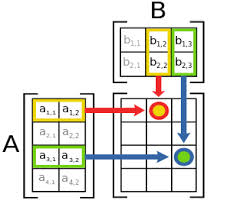
You have often learnt the method of matrix multiplication in Mathematics.
Matrix multiplication
Now,we will perform the same operations in C++ using the concept of 2-d arrays.So,below is the source code of the program.
Source code
#include<iostream>
#include<conio.h>
using namespace std;
void addition();
void subtraction();
void multiplication();
int mat1 [3][3], mat2[3][3],mat3[3][3], i ,j, k, sum,ab,ch;
int main()
{
int choice;
{
x:
cout<<"\t"<<"\t"<<"MAIN MENU"<<"\t"<<"\t"<<endl<<endl<<endl;
cout<<"Press 1 for 3*3 matrix multiplication."<<endl<<endl;
cout<<"Press 2 to exit from the program."<<endl<<endl;
cout<<"Enter your choice:";
cin>>choice;
switch(choice)
{
case 1:
multiplication();
break;
case 2:
return 0;
default:
cout<<"Invalid choice !!"<<endl<<endl;
}
goto x;
}
}
void multiplication()
{
cout<<"\nEnter values for first 3 x 3 matrix:\n";
for ( i = 0 ; i <= 2 ; i++ )
{
for (j = 0 ; j <= 2 ; j++ )
cin>>mat1 [i][j];
}
cout<<"\n Enter values for second 3 x 3 matrix:\n";
for ( i = 0 ; i <= 2 ; i++ )
{
for ( j = 0 ; j <= 2 ; j++ )
cin>>mat2[i][j];
}
cout<<"\n The first 3 x 3 matrix entered by you is:\n";
for ( i = 0 ; i <= 2 ; i++ )
{
for ( j = 0 ; j <= 2 ; j++ )
cout<< mat1[i][j]<<"\t";
cout<<endl<<endl;
}
cout<<"\n the second 3 x 3 matrix entered :\n";
for ( i = 0 ; i <= 2 ; i++ )
{
for ( j = 0 ; j <= 2 ; j++ )
cout<< mat2[i][j]<<"\t" ;
cout<<endl<<endl;
}
for ( i = 0 ; i <= 2 ; i++ )
{
for ( j = 0 ; j <= 2 ; j++ )
{
sum = 0;
for ( k = 0 ; k <=2 ; k++ )
sum = sum + mat1 [i][k] * mat2[k][j];
mat3[i][j] = sum ;
}
}
cout<<"\nThe product of the above two matrices is:\n";
for ( i = 0 ;i<= 2 ; i++ )
{
for ( j = 0 ; j <= 2 ; j++ )
cout<<mat3[i][j]<<"\t";
cout<<endl<<endl;
}
}
Output
Labels:
Arrays,
C,
C++,
C++ coding,
C++ programming,
C++ programs,
Coding,
CPP,
khgamujtaba,
programming,
Programs
Monday, 17 August 2015
Matrix addition and subtraction in C++
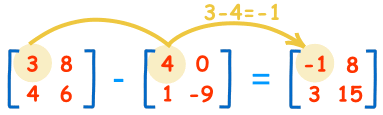
You are well aware of the matrix addition and subtraction in Mathematics.
Matrix addition
Matrix subtraction
Now,we will perform the same operations in C++ using the concept of 2-d arrays.So,below is the source code of the program.
Source code
#include<iostream>
#include<conio.h>
using namespace std;
void addition();
void subtraction();
int mat1[2][2], mat2[2][2],mat3[2][2], i ,j, k, sum,ab,ch;
int main()
{
int choice;
{
x:
cout<<"\t"<<"\t"<<"MAIN MENU"<<"\t"<<"\t"<<endl<<endl<<endl;
cout<<"Press 1 for 2*2 matrix addition."<<endl<<endl;
cout<<"Press 2 for 2*2 matrix subtraction."<<endl<<endl;
cout<<"Press 3 to exit from the program."<<endl<<endl;
cout<<"Enter your choice:";
cin>>choice;
switch(choice)
{
case 1:
addition();
break;
case 2:
subtraction();
break;
case 3:
return 0;
default:
cout<<"Invalid choice !!"<<endl<<endl;
}
goto x;
}
}
void addition()
{
cout<<"\nEnter values for first 2 x 2 matrix:\n";
for ( i = 0 ; i <= 1 ; i++ )
{
for (j = 0 ; j <= 1 ; j++ )
cin>>mat1 [i][j];
}
cout<<"\n Enter values for second 2 x 2 matrix:\n";
for ( i = 0 ; i <= 1 ; i++ )
{
for ( j=0 ; j<=1 ; j++ )
cin>>mat2[i][j];
}
cout<<"\n The first 2 x 2 matrix entered by you is:\n";
for ( i=0 ; i<=1 ; i++ )
{
for ( j=0 ; j<=1 ; j++ )
cout<< mat1[i][j]<<"\t";
cout<<endl<<endl;
}
cout<<"\n the second 2 x 2 matrix entered :\n";
for ( i = 0 ; i <= 1 ; i++ )
{
for ( j = 0 ; j <= 1 ; j++ )
cout<< mat2[i][j]<<"\t";
cout<<endl<<endl;
}
for(i=0;i<=1;i++)
{
for(j=0;j<=1;j++)
{
mat3[i][j] = mat1[i][j] + mat2[i][j];
}
}
cout<<"The addition of matrices:"<<endl<<endl;
for(i=0;i<=1;i++)
{
for(j=0;j<=1;j++)
cout<<mat3[i][j]<<"\t";
cout<<endl<<endl;
}
}
void subtraction()
{
cout<<"\nEnter values for first 2 x 2 matrix:\n";
for ( i = 0 ; i <= 1 ; i++ )
{
for (j = 0 ; j <= 1 ; j++ )
cin>>mat1 [i][j];
}
cout<<"\n Enter values for second 3 x 3 matrix:\n";
for ( i = 0 ; i <= 1 ; i++ )
{
for ( j = 0 ; j <= 1 ; j++ )
cin>>mat2[i][j];
}
cout<<"\n The first 2 x 2 matrix entered by you is:\n"<<endl;
for ( i = 0 ; i <= 1 ; i++ )
{
for ( j = 0 ; j <= 1 ; j++ )
cout<< mat1[i][j]<<"\t";
cout<<endl<<endl;
}
cout<<"\n the second 2 x 2 matrix entered :\n"<<endl;
for ( i = 0 ; i <= 1 ; i++ )
{
for ( j = 0 ; j <= 1 ; j++ )
cout<< mat2[i][j]<<"\t";
cout<<endl<<endl;
}
for(i=0;i<=1;i++)
{
for(j=0;j<=1;j++)
mat3[i][j]=mat1[i][j]-mat2[i][j];
}
cout<<"The subtraction of matrices:"<<endl<<endl;
for(i=0;i<=1;i++)
{
for(j=0;j<=1;j++)
cout<<mat3[i][j]<<"\t";
cout<<endl<<endl;
}
}
Output
Thursday, 13 August 2015
C++ The Complete Reference
Introduction
C++ The Complete Reference
Master programmer and best-selling author Herb Schildt has updated and expanded his classic reference to C++. Using expertly crafted explanations, insider tips, and hundreds of examples, Schildt explains and demonstrates every aspect of C++. Inside you'll find details on the entire C++ language, including its keywords, operators, preprocessor directives, and libraries. There is even a synopsis of the extended keywords used for .NET programming. Of course, everything is presented in the clear, crisp, uncompromising style that has made Herb Schildt the choice of millions. Whether you're a beginning programmer or a seasoned pro, the answers to all your C++ questions can be found in this lasting resource.
Detailed coverage includes:
- Data types and operators
- Control statements
- Functions
- Classes and objects
- Constructors and destructors
- Function and operator overloading
- Inheritance
- Virtual functions
- Namespaces
- Templates
- Exception handling
- The I/O library
- The Standard Template Library (STL)
- Containers, algorithms, and iterators
- Principles of object-oriented programming (OOP)
- Runtime type ID (RTTI)
- The preprocessor
- Much, much more
Author:
Herbert Schildt
Date of publishing:
November 19, 2002
Publisher:
McGraw-Hill Education
Language:
English
Genre:
Programming
ISBN:
- ISBN-10: 0072226803
- ISBN-13: 978-0072226805
Rating:
4.3/5.0 stars
Votes:
37
Labels:
books,
C,
C++,
C++ books,
computer,
CPP,
khgamujtaba,
programming
Wednesday, 12 August 2015
Two-dimensional arrays in C++
Definition
In C++ Two Dimensional array in C++ is an array that consists of more than one rows and more than one column. In 2-D array each element is refer by two indexes. Elements stored in these Arrays in the form of matrices. The first index shows a row of the matrix and the second index shows the column of the matrix.
Syntax
data type name of array[no. of rows][no. of columns]
For example,
int item[4][5];
Accessing each location
In order to store values in a C++ two dimensional arrays the programmer have to specified the number of row and the number of column of a matrix. To access each individual location of a matrix to store the values the user have to provide exact number of row and number of column.
Example:
int matrix[2][2];
matrix[0][0]=20;
matrix[0][1]=25;
matrix[1][0]=30;
matrix[1][1]=35;Entering data
Nested loop is used to enter data in 2-D arrays. It depends upon the programmer which loop he wants to use it could be While loop or it could be a For loop. The outer loop acts as the number of rows of a matrix and the inner loop acts as the number of columns of a matrix.
The reference of this article has been taken from
Example:
#include<iostream.h>#include<conio.h>main(){int matrix [5] [5];for (int m1=0 ; m1<5 ; m1++){for (int m2=0 ; m2<5 ; m2++){Matrix [m1] [m2] = 5 ;}}getch();}
|
Labels:
Arrays,
C,
C++,
C++ coding,
C++ programs,
Coding,
computer,
khgamujtaba,
programming
Saturday, 8 August 2015
Arrays in C++
Concept of arrays
One of the most important concepts in C++ is arrays.Today I will explain the concept of arrays with daily life examples.For this article,I am taking help from the Android application "C++ little drops".
Suppose we want to calculate the average of the marks for a class of 20 students ,we certainly do not want to create 30 variables: std1,st2,std3,.......std.20.Instead,we can use a single variable,called an array with 30 elements.
Definition of arrays
An array is a list of elements of the same type(e.g., int), identified by a pair of square brackets [ ].
Declaration of arrays
To use an array, we need to declare the array with 3 things: a name, a type and a dimension( or size, or length).Remember that an array always starts with index 0.It means that the first value in an array is stored in index 0.The syntax is as follows:
Syntax
type arrayName[array length];
It is recommended to use a plural name for array.e.g., marks,numbers, books,etc.
int books[10];
We can also initialize the array during declaration with a comma-separated list of values,as follows:
int numbers{2,4,5,6,3,9,12,14};
Example
A simple program will help you understand this concept more clearly.
Source code
#include<iostream>
#include<conio.h>
using namespace std;
main()
{
int numbers[5]={1,2,3,4,5}; //an array "numbers"
cout<<"The first number: "<<numbers[0]<<endl; // number stored in index 0;
cout<<"The second number: "<<numbers[1]<<endl;
cout<<"The third number: "<<numbers[2]<<endl;
cout<<"The fourth number: "<<numbers[3]<<endl;
cout<<"The fifth number:"<<numbers[4]<<endl;
}
Output
Labels:
Arrays,
C,
C++,
C++ coding,
C++ programming,
C++ programs,
Coding,
CPP,
khgamujtaba,
programming
Friday, 7 August 2015
Tuesday, 4 August 2015
Subscribe to:
Posts (Atom)