-moz-user-select:none; -webkit-user-select:none; -khtml-user-select:none; -ms-user-select:none; user-select:none;
Showing posts with label Programs. Show all posts

Saturday, 23 January 2016

Concept of files in C++

Many students are confused with the concept of file handling in C++.So,today I will give you a little introduction about the concept of files in C++ which the essence of file handling.This would be a series of blogs which will help you to understand this concept easily.So,stay tuned !!1

Concept of files

As we see that a program inputs data from the user and stores it in variables.The data stored in the variables is temporary.When the program ends,all data stored in variables is also destroyed. The user has  to input data again from keyboard when the program is executed next time. the data has to be entered each time the program is executed that wastes time. The user may also type wrong data at different times.

Definition of files

A file is a collection of related records.It stores data about an entity(if you are unfamiliar with the concept of entity, remember that an entity is an object about which data is to be gathered.e.g., student is an entity). A data file can be used to provide input to a program.In can also be used to store the output of a program permanently.


Advantages of files

Now we will discuss the advantages of files in C++.

  • Files can store large amount of data permanently.
  • Files can be updated easily.
  • One file can be used by many programs for same input.
  • Files save time and effort to input data via keyboard.

Types of files

C++ provides two types of files.This categorization is based on how data is stored in files. Following are the types of files in C++.

Text files

A type of file that stores data as readable and printable characters in called text file.A source program of C++ is an example of text file.


Binary files

A type of file that stores data as non-readable binary code is called binary file.An object file of a C++ program is an example of binary file.


Reference

This reference of this article is taken from the book,Object Oriented Programming using C++(IT series).

Sunday, 22 November 2015

Comparison between C++ and Haskell

Consider that you are a "Haskell" programmer and you have to write several lines of codes to simply print "Hello World". What would be your feelings?

Coding in Haskell

So,as a  C++ programmer,you should be proud of your self as you only have to write cout<<"Hello World"; to print the same statement.

Monday, 9 November 2015

C++ manipulators

C++ manipulators

Manipulators are used to change/rotate the output in different styles.They are the mlost common way to control the format of output in C++.

Some of the most important manipulators that are used in C++ are:
  • endl
  • setw
  • setprecision
Today,in my blog,I will discuss the manipulators mentioned above and their functionality in C++.

'endl' Manipulator:

                                      The word  'endl' stands for end of line.It is used to move the cursor to the beginning of the next line.It requires no parameter.

Example:

cout<<"codingwithcplusplus.blogspot.com"<<endl;
cout<<"Blogging my passion";

It will show the output as below:

codingwithcplusplus.blogspot.com
Blogging my passion

'setw' Manipulators:

                                                    The word 'setw' stands for set width.It is used to display the value of an expression in specified columns.The output is right justified by default.It is necessary to include header file "iomanip.h" to use this manipulator.

Example:

cout<<"Hello"<<setw(4)<<"World";

It will show the output as below:

Hello    World

I think no more explanation is required. :-)

'setprecision' Manipulator:

                                               It is used to set the number of digits to be displayed after decimal point.The value is rounded with the use of this manipulator.

Example:

Suppose the value of x=10.0

cout<<setprecision(2)<<x;

It will show the output as:

10.00

Now,consider

cout<<setprecision(5)<<x;

It will show the output as:

10.00000


Saturday, 17 October 2015

Importance of pointers in C++

Today I found a very helpful article on "programmers.stackexchange.com" regarding the importance of pointers in C++.This article was written by David Thornley.So,I decided to share it with all my readers.

Importance of pointers in C++

Pointers are necessary for dynamic memory location, many data structures, and efficient handling of large amounts of data. Without pointers, you'd have to allocate all the program data globally or in functions or the equivalent, and you'd have no recourse if the amount of data grew beyond what you had originally allowed for. I hesitate to use absolutes here, but as far as I know all modern computer languages have pointers in some form or other.
In most languages that use pointers, there are certain sorts of references that are pointers, and perhaps certain sorts of references that aren't, and there is no further notational difference. A Lisp cons cell is a pair of pointers, although a fixnum is not a pointer. In Java, the variable used for the instance of a class is a pointer, but an int isn't. The language syntax doesn't reflect that.
C is unusual in that pointers are optional, explicit, and allow explicit pointer arithmetic. It is perfectly possible to write struct foo bar; struct foo * baz;, and once you've allocated memory for bazyou can use both bar and baz to represent struct foos. Since pointers are optional, it is useful to have notational differences. (It's essential in C++ for smart pointers, as given boost::shared_ptr<foo> bar;bar.reset() has one meaning and bar->reset() is likely to have a much different one.)
(Actually, explicit pointers were often used in other languages when C was originally being developed, such as ^ in Pascal. C is an older language than most in common use today, and it shows.)
One of C's design goals was to write Unix in, and therefore it needed to handle memory locations in a detailed manner. (C is actually one of a family of system implementation languages common when it was being designed, another example being Cybol for Control Data computers. C is the one that became a big hit.) Therefore, it is possible to manipulate C pointers directly, assigning memory addresses and calculating new ones. This also led to some design decisions in C. C arrays are based heavily on pointer arithmetic, and indeed an array decays into a pointer in very many situations. Passing variables to C functions by reference is done by pointer. There was no strong need for arrays and passing variables by reference in the form that other contemporary languages had, so C didn't get those.
So, the answer is that, in most languages nowadays, you use pointers constantly without being reminded of the fact. In C, and to a lesser extent C++, you use pointers either to do low-level things, or as accomplish higher-level things that there's no special notation for.

Monday, 28 September 2015

Example of pointers in C++

As we know that a pointer is a variable whose value is the address of another variable. To demonstrate it,consider the following example.


Source code


#include <iostream>

using namespace std;

int main ()

{

   int  var1;

   cout << "Address of var1 variable: ";

   cout << &var1 << endl;

   return 0;

}

Output


Example of pointer
Example of pointer


Reference


To know the reference of this blog,

Saturday, 22 August 2015

Matrix multiplication in C++

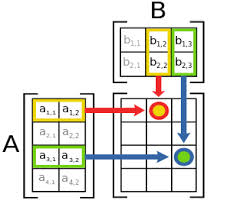
You have often learnt the method of matrix multiplication in Mathematics.

Matrix multiplication


MAtrix multiplication

Now,we will perform the same operations in C++ using the concept of 2-d arrays.So,below is the source code of the program.

Source code

#include<iostream>
#include<conio.h>
using namespace std;
void addition();
void subtraction();
void multiplication();

int mat1 [3][3], mat2[3][3],mat3[3][3], i ,j, k, sum,ab,ch;
int main()
{
int choice;
{
x:
cout<<"\t"<<"\t"<<"MAIN MENU"<<"\t"<<"\t"<<endl<<endl<<endl;
cout<<"Press 1 for 3*3 matrix multiplication."<<endl<<endl;
cout<<"Press 2 to exit from the program."<<endl<<endl;
cout<<"Enter your choice:";
cin>>choice;
switch(choice)
{
case 1:
multiplication();
break;
case 2:
return 0;
default:
cout<<"Invalid choice !!"<<endl<<endl;
}

goto x;
}
}
void multiplication()
{     
           cout<<"\nEnter values for first 3 x 3 matrix:\n";
           for ( i = 0 ; i <= 2 ; i++ )
                {
                   for (j = 0 ; j <= 2 ; j++ )
                        cin>>mat1 [i][j];
                }
                        cout<<"\n Enter values for second 3 x 3 matrix:\n";
                   for ( i = 0 ; i <= 2 ; i++ )
                        {
                            for ( j = 0 ; j <= 2 ; j++ )
                                   cin>>mat2[i][j];
                        }
                       cout<<"\n The first 3 x 3 matrix entered by you is:\n";
                            for ( i = 0 ; i <= 2 ; i++ )
                                 {
                                       for ( j = 0 ; j <= 2 ; j++ )
                                              cout<< mat1[i][j]<<"\t";
                                              cout<<endl<<endl;
                                 }
                                              cout<<"\n the second 3 x 3 matrix entered :\n";
                                       for ( i = 0 ; i <= 2 ; i++ )
                                            {
                                                for ( j = 0 ; j <= 2 ; j++ )
                                                       cout<< mat2[i][j]<<"\t" ;
                                                       cout<<endl<<endl;
                                            }
                                       for ( i = 0 ; i <= 2 ; i++ )
                                            {
                                                for ( j = 0 ; j <= 2 ; j++ )
                                                      {
                                                          sum = 0;
                                                            for ( k = 0 ; k <=2 ; k++ )
                                                                   sum = sum + mat1 [i][k] * mat2[k][j];
                                                                   mat3[i][j] = sum ; 
                                                       }
                                             }
                                                                   cout<<"\nThe product of the above two matrices is:\n";
                                                                   for ( i = 0 ;i<= 2 ; i++ )
                                                                        {
                                                                             for ( j = 0 ; j <= 2 ; j++ )
                                                                                      cout<<mat3[i][j]<<"\t";
                                                                                      cout<<endl<<endl;
                                                                         }
                                                                     }

Output

Matrix multiplication in C++


Saturday, 15 August 2015

Initialization of 2-d arrays in C++

Initializing 2-dimensional array

The 2-D arrays which are declared by the keyword int and able to store integer values are called two dimensional integer arrays. The process of assigning values during declaration is called initialization. TheseArrays can be initialized by putting the curly braces around each row separating by a comma also each element of a matrix should be separated by a comma.

Example: 

int mat[3][3]={ {2,3},{4,5},{6,7} }

Initializing 2-d character array

The 2-D arrays which are declared by the keyword char and able to store characters are called two dimensional character arrays. 2-D character array can be initialized by putting the curly braces around each row as well as apostrophe around every alphabet.

Example:

char character[3][3]={'b', 'a' ,'t' ,'f', 'a' ,'t' ,'m' ,'a' ,'t'};

reference

The reference of this article is taken from


In my next blog inshAllah,I will post an important example of 2-d arrays that will be very helpful in understanding this concept.So,stay tuned.

Sunday, 9 August 2015

Swapping two numbers

"Swapping two number" is one of the most popular and easiest program of C++. If you want to make a good logic in C++,then you should practice this code.

Today I am here with the source code of this program.Hope you will like my effort.

Source code

sSwapping in C++

Output

Output of swapping

Logic

Below is the logic of this program.

I have taken 3 variables for this program,"a,b and tem(or temporary).

According to logic,

Suppose the value of a is 10 and the value of b is 20.

According to the given condition,

tem=a;
tem=10;
a=b
10=b or b=10;
b=tem
20=tem
b=10.

So,after swapping,the value of "a" becomes 20 and the value of "b" becomes 10. 

The ANCI C programming language

INTRODUCTION

C++ book
The ANCI C programming language
The authors present the complete guide to ANSI standard C language programming. Written by the developers of C, this new version helps readers keep up with the finalized ANSI standard for C while showing how to take advantage of C's rich set of operators, economy of expression, improved control flow, and data structures. The 2/E has been completely rewritten with additional examples and problem sets to clarify the implementation of difficult language constructs. For years, C programmers have let K&R guide them to building well-structured and efficient programs. Now this same help is available to those working with ANSI compilers. Includes detailed coverage of the C language plus the official C language reference manual for at-a-glance help with syntax notation, declarations, ANSI changes, scope rules, and the list goes on and on.

 Authors:

                            Brian W.Kernighan and Dennis.M.Ritchie.

Date of publishing:

                                                        April 1,1988.

Publisher:

                              Prentice Hall.

Language:

                             English

genre:            

                       programming.

ISBN:
               ISBN-10: 0131103628
  •                ISBN-13: 978-0131103627

Rating:

                     4.5/5.0 stars

Votes: 

                       514 

Reviewer:

                          Mark Cristie 


Review date:

                                 March 13,2000.

Reviewer rating:

                                            5.0/5.0 stars.

Download link:

                                           Click here                                      


Definition of a programmer

How would you define a programmer?

Definition of a programmer

Monday, 6 July 2015

Concatenation of strings in C++


Today I am here with a program that will perform the operation of concatenation of strings of addition of strings.

Concatenation of strings

In formal language theory and computer programming, string concatenation is the operation of joining character strings end-to-end. 

For example,"Hello" is string # 1 and "World" is string # 2.So,after concatenation,the result will be "Hello World".

Below is the source code of this program.

Source code

#include <iostream>
using namespace std;
int main()
{
    char s1[100], s2[100];
    int i, j;
    cout << "Enter first string: ";
    cin >> s1;
    cout << "Enter second string: ";
    cin >> s2;
    for(i=0; s1[i]!='\0'; ++i);  /* i contains length of string s1. */
    for(j=0; s2[j]!='\0'; ++j, ++i) //it adds two strings
    {
        s1[i]=s2[j];
    }
    s1[i]='\0'; 
    cout << "After concatenation: " << s1;
    return 0;
}

The reference of this program is taken from Concatenation.

Output

concatenation of strings

Friday, 26 June 2015

String characteristics

In my previous blog, I have given you an introduction to strings.Today I will discuss on some string characteristics or you can say,"string operations".

String size( )

If you want to find the length of any string, then its syntax is as follows:
 str.length( );

String length( )

If you want to find the length of any string, then its syntax is as follows:
 str.length( );

String capacity( )

If you want to find the capacity of any string, then its syntax is as follows:

str.capacity( );

Maximum size( )

If you want to size the maximum size of any string, then its syntax is as follows:

str.max_size( );

String empty or not

If you want to check whether the string is empty or not,then its syntax is as follows:

(str.empty?"yes":"no") ; (it is same as conditional operator)

So, to implementation of these operations is as follows:

Source code

#include<iostream>
#include<string.h>
using namespace std;
main()
{
string s1;
cout<<"Enter any string:";
getline(cin,s1); // syntax for getting the input of string
cout<<"Size="<<s1.size()<<endl<<endl;
cout<<"Length="<<s1.length()<<endl<<endl;
cout<<"Capacity="<<s1.capacity()<<endl<<endl;
cout<<"Maximum size="<<s1.max_size()<<endl<<endl;
cout<<"Empty="<<(s1.empty()?"yes":"no")<<endl<<endl;
}

Output

C++,khgamujtaba,string characteristics

Monday, 22 June 2015

Concept of string

Today I am here with the concept of string in C++.

Remember that the header file for string is <string.h> in C++(may vary in different compilers).

String

A string is used to represent a sequence of characters regarded as a single data item. In C++ strings of characters are held as an array of characters, one character held in each array element. In addition a special null character, represented by `\0', is appended to the end of the string to indicate the end of the string. Hence if a string has characters then it requires an n+1 element array (at least) to store it. Thus the character `a' is stored in a single byte, whereas the single-character string "a" is stored in two consecutive bytes holding the character `a' and the null character.

Remember that the difference between a string data type variable and character data type variable is that a variable with character data type can store single character and it does not include space or the characters after space but a varible with string data type  can store multiple characters and it includes space or the characters after space 

In the below example, the string variable has data type "string".

Source code

#include<iostream>
#include<string.h>
using namespace std;
main()
{
string s1;
s1="Hello welcome to my blog";
cout<<s1;
}

Output

C++,khgamujtaba,strings in C++

Remember that the characters written a string are enclosed in curly braces.

Thursday, 18 June 2015

Fibonacci series using recursion

Hello and Asalam o Alikum.I hope you have read my previous blogs about recursion in C++.So, today is my last blog about recursion.

Today I will provide you the source code of generating fabonacci series using recursion.Remember that when you planned to find fibanacci series in C++, simply use this method.This method is easier to understand than other methods.

Below is the source code of this program.

Source code


#include <iostream>
using namespace std;

int fibonacci(int num)
{
if(num==0)
return 0;
if(num==1){
return 1;
}
else{
return fibonacci(num-1)+fibonacci(num-2);
}
}

int main()
{
int n;
cout<<"Enter the number of items you want to display: ";
cin>>n;
for(int i=1;i<=n;i++){
cout<<fibonacci(i)<<"\t";
}
return 0;
}

Output

C++,fibonacci series,khgamujtaba,recursion,fibanacci series using recursion

Remember that the basic idea behind solving problems via recursion is to break the instance of the problem into smaller and smaller pieces until the pieces are so small they can be solved trivially. 

Thursday, 11 June 2015

Finding factorial by recursion

As I have discussed in my previous blog that a function that repeats itself is called recursion.So, today I am here with  a very common example of recursion in C++. In this example, I will find the factorial of a given number by recursion.Below is the source code of this program.

Source code

  1. #include <iostream>
  2. using namespace std;

  3. int factorial(int);

  4. int main() {
  5.     int n;
  6.     cout<<"Enter a number: ";
  7.     cin>>n;
  8.     cout<<"Factorial="<<factorial(n);
  9.     return 0;
  10. }

  11. int factorial(int n) {
  12.     if (n>1) {
  13.         return n*factorial(n-1);
  14.     }
  15.     else {
  16.         return 1;
  17.     }
  18. }

Output

C++,programming,recursion,khgamujtaba,factorial

Explanation
Suppose user enters 4 which is passed to function factorial(). Here are the steps involved:
  • In first factorial() function, test expression inside if statement is true. The statement return num*factorial(num-1); is executed, which calls second factorial() function and argument passed is num-1 which is 3.
  • In second factorial() function, test expression inside if statement is true. The statementreturn num*factorial(num-1); is executed, which calls third factorial() function and argument passed is num-1 which is 2.
  • In third factorial() function, test expression inside if statement is true. The statement return num*factorial(num-1); is executed, which calls fourth factorial() function and argument passed is num-1 which is 1.
  • The fourth factorial() function, test expression inside if statement is false. The statementreturn 1; is executed, which returns 1 to third factorial() function.
  • The thrid factorial() function returns 2 to second factorial() function.
  • The second factorial() function returns 6 to first factorial() function.
  • Finally, first factorial() function returns 24 to the main() function and is displayed.        ( The above reference has been taken from www.programiz.com)

Tuesday, 9 June 2015

Recursion in C++

Hello and Asalam o Alikum. Many students are confused with the concept of recursion in C++.So,today I will try to discuss all the basics of recursion in C++.

Recursion

A recursive function is a function that calls itself,either directly or indirectly(through another function).A recursive function is called to solve a problem. If the function is called with a base case, then function simply returns a result. If a function is called with a more complex problem, it typically divides the problem into two conceptual pieces,a piece that the function knows how to do and the piece that the function doen not know.

To make recursion feasible, the latter piece must resemble the original problem, but be a slighty smaller version. This new problem looks like the original problem, so the function launches a fresh copy of itself to work on the smaller problem. This is referred to as recursive call and is also called the recursive step.

The basic idea behind solving problems via recursion is to break the instance of the problem into smaller and smaller pieces until the pieces are so small they can be solved trivially. 

General example

For example, we can define the operation "find your way home" as:
  1. If you are at home, stop moving.
  2. Take one step toward home.
  3. "find your way home".
Here the solution to finding your way home is two steps (three steps). First, we don't go home if we are already home. Secondly, we do a very simple action that makes our situation simpler to solve. Finally, we redo the entire algorithm.(reference of general example has been taken from reference)

Sunday, 7 June 2015

Using loops in structures


Hello and Asalam o Alikum. Today I am here with a new blog that will take demonstate the use of loops in structures.

In the program,I will take input from the user of his/her favourite movies and finally display the list of his/her favourite movies using structures in C++.I will use a loop to input 3 movies from the user.

So,below is the source code of this program.

Source code

  1. #include<iostream>
  2. #include<conio.h>
  3. #include<string>
  4. using namespace std;
  5. struct movies
  6. {
  7. string movie;
  8. };
  9. main()
  10. {
  11. movies m[3];
  12. for(int i=0;i<=2;i++)
  13. {
  14. cout<<"Enter the movie of your choice:";
  15. getline(cin,m[i].movie);
  16. }
  17. cout<<endl;
  18. cout<<"\t"<<"\t"<<"List of your favourite movies"<<"\t"<<"\t"<<endl<<endl;
  19. for(int i=0;i<=2;i++)
  20. {
  21. cout<<i+1<<"."<<m[i].movie<<endl<<endl;
  22. }
  23. }

Output


Explanation
I have used <string> header file in line # 3 because I have "string" data type in line # 7.

In line # 11, I have declared an array of size 3 and data type movies.

In line #12, a "for" loop is used for 3 iterations.

Remember that if we do not use the header file <string>, then we cannot use getline( ) function as used in line # 16.

Friday, 5 June 2015

Maintaining records in structures

As discussed earlier, structures are of great important for user-defined data types.Today I will discuss the use of functions in structures in C++ programming.

Below is the source code of a program in which I will maintain the record of two patients using structure in C++.I will use two functions in it;one for getting the record of the patients and one for displaying the record of the patients.So,before going into the further details of the program,lets discuss its source code first.

Source code

  1. #include<iostream>
  2. #include<conio.h>
  3. #include<string>
  4. using namespace std;

  5. struct patient
  6. {
  7. string name;
  8. string disease;
  9. };

  10. void getrecord(patient &p1 ,patient &p2)
  11. {
  12. cout<<"Enter the name of first patient:";
  13. cin>>p1.name;
  14. cout<<"Enter the name of disease:";
  15. cin>>p1.disease;
  16. cout<<"Enter the name of second patient:";
  17. cin>>p2.name;
  18. cout<<"Enter the name of disease:";
  19. cin>>p2.disease;
  20. }

  21. void displayrecord(patient p1, patient p2)
  22. {
  23. cout<<"Name of first patient:"<<p1.name<<endl;
  24. cout<<"Disease of first patient:"<<p1.disease<<endl;
  25. cout<<"Name of second patient:";
  26. cout<<p2.name<<endl;
  27. cout<<"Disease of second patient:";
  28. cout<<p2.disease<<endl;
  29. }
  30. int main()
  31. {
  32. patient p1,p2;
  33. char ch;
  34. int n;
  35. do 
  36. {
  37. cout<<"Enter 1 for getting record and 2 for displaying record:";
  38. cin>>n;
  39. switch(n)
  40. {
  41. case 1:
  42. getrecord(p1,p2);
  43. break;
  44. case 2:
  45. displayrecord(p1,p2);
  46. break;
  47. default:
  48. cout<<"Invalid choice!";
  49. }
  50. cout<<"Enter y to continue and n to terminate:";
  51. cin>>ch;
  52. }
  53. while(ch!=n);
  54. getch();
  55. return 0;
  56. }

Output


Explanation:

In this program,I have declared a structure named "struct".

In line # 13, I have declared a function for getting the record from the user in which I have passed the values by reference.

In line # 24, I have declared a function for displaying the data entered by the user.

In line # 42, I have declared a "switch" in which there are two cases;one case for getting the record from the user and one case for displaying the record from the user.